Site manager
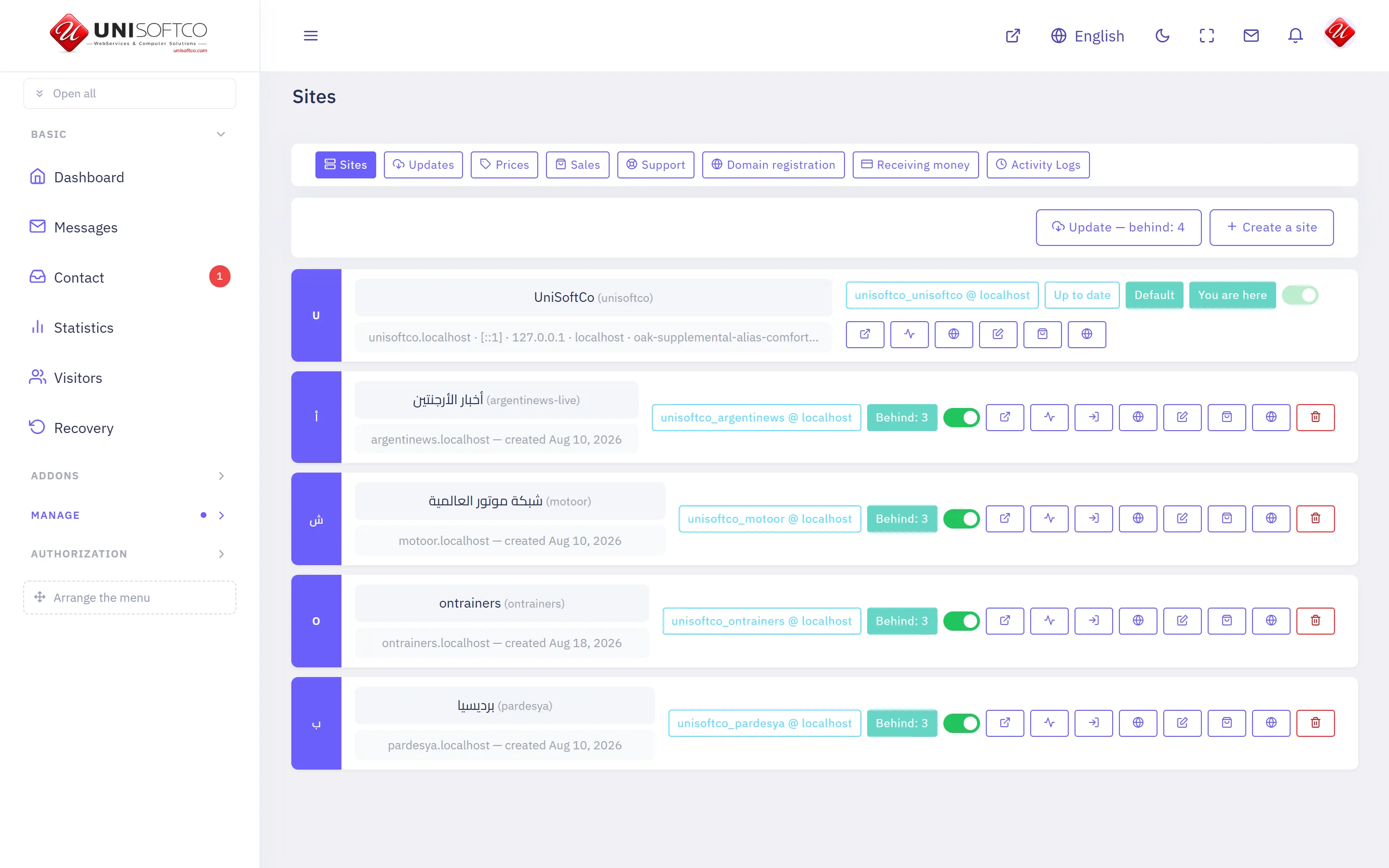
Every site this server carries: what it is called, where it answers, and whether it is running.
Everything below is declared by Site manager itself, so it describes this deployment rather than a manual — and it is rewritten whenever the program changes.
What it is
- Its key is Management, which is also the prefix of every component it owns.
- It is free: every site on this platform has it, and no entitlement can take it away.
- It is the manager's own, and never appears on a customer's site whatever he bought.
What it may be allowed to do
These are the permissions it declares. A person sees one of its screens only where his role carries the matching permission.
- management.create
- management.manage
- management.remove
- management.view
What it puts on a page
8 components, each of which can be dropped onto a page in the composer.
Buy from this platform
Four panels a visitor buys through: where to start, what he wants, who he is, and how he pays. A website is handed over the moment it is paid for; a server is promised the time set in the prices tab.
Placed as Management.Buy.
10 settings:
- Which of the two it offers — chosen from Websites and servers, side by side, Websites only, Servers only, left alone it is both. One of the two fills the width on its own — there is no empty column beside it.
- Which server plans it shows — chosen from The first one, as a single offer, All of them, to choose from, left alone it is first. With one plan the two are the same. The row of cards is drawn only where there is more than one.
- The line above the first panel — typed in. Left empty, it says «Start here» in the reader's own language.
- The line under it — typed in. Left empty, it says «Pay for what you want and have it at once» in the reader's own language.
- The second box: its heading — typed in. Left empty, it says «Get an app in minutes» in the reader's own language.
- The second box: the line under it — typed in. Left empty, it explains in the reader's own language that the site becomes a phone application.
- The second box: where its button goes — typed in. An address on this site, taken from its own menu. A page that exists but is not published answers 404, so open the link once after saving. Left empty, the box is drawn without a button.
- The third box: its heading — typed in. Left empty, it says «More than 25 years in technology» in the reader's own language.
- The third box: the line under it — typed in. Left empty, it says in the reader's own language what this company builds.
- The third box: where its button goes — typed in. An address on this site, taken from its own menu — the same rule as the second box above. Left empty, the box is drawn without a button.
Is this domain free
A box a visitor types a domain into. Says whether this platform already answers at it, and whether it is registered in the world.
Placed as Management.DomainSearch.
2 settings:
- The line above the box — typed in. Left empty, the box stands on its own.
- What the empty box says — typed in, left alone it is example.com.
The designs a site can wear
Every design this build carries and what each one can draw. It reads the catalogue rather than a written list, so a design added tomorrow appears without anybody editing the page.
Placed as Management.Designs.
2 settings:
- The heading above the designs — typed in. Left empty, it says «Choose how it looks» in the reader's own language. A single space draws no heading at all.
- The sentence under the heading — typed in. Left empty, it draws the phrase. A single space draws nothing.
The languages this site speaks
Every language switched on for this site, in its own script. It reads the site's own rows, so a language added in the panel appears here without anybody editing the page.
Placed as Management.Languages.
3 settings:
- The heading above the languages — typed in. Left empty, it says «Eight languages, one panel» in the reader's own language — with the real number. A single space draws no heading at all.
- The sentence under the heading — typed in. Left empty, it draws the phrase. A single space draws nothing.
- Show the flags — a switch, left alone it is true. Draws each language's flag beside its name, where the deployment has the flag files. Names alone where it has not.
Ways you can be paid
A strip of the payment methods this site has switched on, for the foot of a page. It draws what the payment settings actually carry, so it cannot promise a gateway nobody has keyed.
Placed as Management.PaymentMarks.
2 settings:
- The line above the marks — typed in. Left empty, it says «Ways you can pay» in the reader's own language. A single space draws no line at all.
- Show the card marks as well — a switch, left alone it is true. Visa, Mastercard and American Express, beside the gateways that take them. Off where a site is paid only by transfer.
What he has with us
A signed-in customer's own sites: where each answers, whether it is serving, and when it next has to be paid for. A stranger is asked to sign in.
Placed as Management.MySites.
One setting:
- The line above the list — typed in. Left empty, the list stands on its own.
What the platform can be
Every addon this build carries, with what each one does. It reads the build rather than a written list, so an addon added tomorrow appears without anybody editing the page.
Placed as Management.Addons.
3 settings:
- The heading above the list — typed in. Left empty, it says «What your site can be» in the reader's own language. A single space draws no heading at all.
- The sentence under the heading — typed in. Left empty, it draws the phrase. A single space draws nothing.
- Mark the ones included free — a switch, left alone it is true. A small word on the addons every site gets without paying for them.
Write to support
A form a signed-in member uses to tell us something is wrong. A stranger is asked to sign in rather than shown a box that will not send.
Placed as Management.Support.
2 settings:
- The line above the form — typed in. Left empty, the form stands on its own.
- Show him what he has already sent — a switch, left alone it is true. His own tickets and the answers to them, under the form.
Comments
Nobody has written yet. Be the first.
This article is not taking comments.